Bluetooth Auracast is a new feature of the Bluetooth LE audio standard. Unlike classic Bluetooth pairing (a one-to-one connection), Auracast enables broadcasting : A transmitter (e.g., TV, smartphone, microphone system) can broadcast audio to any number of receivers (headphones, hearing aids, speakers) simultaneously – similar to a radio station, but digital and synchronous. Users can simply "dial in" with their devices or scan a QR code/NFC tag. The headphones can remain paired with and controlled by the smartphone. There's no need to pair and unpair devices as with classic Bluetooth audio.
a) Advantages in the private household
TV
• Individual volume: Several people watch the same film, each with their own headphones and appropriate volume level.
• Hearing aid integration: Hearing aids can connect directly and dialogues are understood more clearly.
• Late-night mode: TV sound through headphones without disturbing others in the household.
Gaming
• Synchronous sound for multiple players: Two or more headsets can be connected to the game sound simultaneously.
• Low latency: Less delay between picture and sound, which is crucial for gaming.
Music
• Multi-room feeling: Multiple speakers or headphones can be connected to one source simultaneously.
• Party mode or “Silent Disco”: Guests can “immerse themselves” in the playlist using their own headphones.
• Flexibility: No more complicated pairing – one click is all it takes to join or leave.
b) Advantages in public or professional environments
Conferences:
• Speech intelligibility: Participants can connect using headphones, even in poor acoustic conditions.
• Multilingualism: Interpreters can offer translations via different Auracast streams.
• Accessibility: People with hearing aids have direct, clear access to the conference audio.
Gyms:
• Individual audio selection: Members choose the appropriate sound for a large display - simply by scanning a QR code.
• Music streams: Trainers or studios can send background music while course participants tune into the workout stream.
Museums, city guide, guided tours:
• Audio guides without loaner devices: Visitors use their own headphones or hearing aids.
• Multiple languages in parallel: One Auracast transmitter broadcasts multiple language versions.
• Flexible experience: Visitors spontaneously decide which tour or information they would like to hear.
For private use, Auracast offers greater convenience, flexibility, and often better audio quality. In public settings, it enables barrier-free, cost-effective, and flexible audio transmission to large groups – without expensive specialized hardware.
Which devices support Auracast?
LE Audio and Auracast have been supported by consumer devices since 2024, for example, by new headphones and Android 16 smartphones (starting with the Google Pixel 8 and Samsung Galaxy S23). The hardware must have at least Bluetooth version 5.2 , and the firmware must support LE Audio/Auracast—a new version number alone is not enough. Many devices already have the hardware, but Auracast often needs to be enabled via updates.
In Auracast, there are essentially three roles :
1. Auracast Broadcaster (Sender / Transmitter)
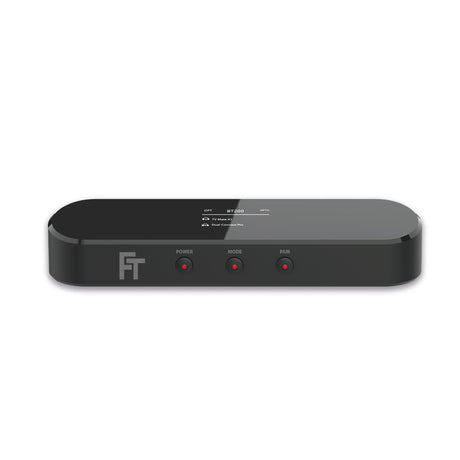
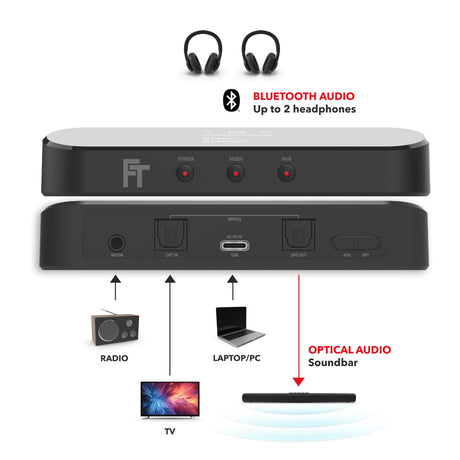
Device that transmits the audio stream into the surrounding environment. Examples: television, smartphone, notebook, conference system, FeinTech BT200 Bluetooth transmitter.
2. Auracast Receiver
A device that connects to a broadcast and plays back the audio. Examples: headphones, speakers, hearing aids, smartphones in "listening mode". A receiver can select between several available broadcasts (e.g., Gym TV 1, TV 2).
3. Auracast Assistant
A device that simplifies broadcast management and enables access to private streams. Typically, this is a smartphone that scans and lists available broadcasts and facilitates joining via QR code or NFC. The assistant itself doesn't necessarily have to play audio – it serves as a "remote control" for accessing the stream.
Important: A device can perform multiple roles simultaneously. For example, a smartphone can be a sender (broadcasting from the phone's music player) and an assistant (selecting other streams) at the same time. A PC can be both a sender (e.g., for presentation audio) and a receiver (e.g., for incoming conference translation) simultaneously.
Here's how it looks with the other operating systems:
- Windows 11 has supported Bluetooth LE Audio (including the LC3 codec) since 2024, provided compatible hardware is present. However, Auracast itself is not yet officially integrated into Windows. Device manufacturers (e.g., headphones, PCs with Qualcomm/Broadcom chipsets) can already utilize LE Audio via their own drivers, but the Auracast broadcast function is not yet available system-wide. This will change soon.
- Apple macOS/iOS currently relies on its own solutions specifically for its AirPods. Auracast is not yet possible.
- LE Audio is still experimental under Linux , but should become more widely available in the coming months.
Auracast in practice
In practice, the use of Auracast can look like this:
You can start an Auracast stream using software or by using an audio transmitter such as the FeinTech BT200, to which an audio signal is fed.
Some headphones allow you to select an Auracast mode at the touch of a button and receive the free broadcast directly. This works, for example, with Creative Zen Hybrid Pro headphones.
With most headphones, you can conveniently select the broadcast via a headphone-specific app on your smartphone. The app first lists all available broadcasts. You then select a stream for playback.


When you press PLAY in the app, the selected broadcast will be transmitted to your headphones that are paired with your smartphone.
If the stream is not public, you will need to enter a PIN before playback:

Difference between Bluetooth LE and LE Audio
Auracast is based on LE Audio. This can easily be confused with Bluetooth LE (Low Energy). Bluetooth LE and LE Audio are related but distinct concepts within Bluetooth technology.
Bluetooth LE is a general, low-power variant of Bluetooth and was introduced with Bluetooth 4.0. It was primarily developed for sensors in smart homes and industrial applications, as well as for smartwatches, to save energy. It did not previously support audio transmission.
LE Audio, on the other hand, is a new audio technology that has only been available on the mass market since 2025. It extends Bluetooth LE with audio streaming capabilities and offers better sound quality and lower energy consumption than classic Bluetooth Audio.
The Auracast and Bluetooth® word marks and logos are registered trademarks owned by Bluetooth SIG, Inc. and are used by FeinTech under license. Other trademarks and trade names are the property of their respective owners.