Directly from the specialist – high-quality technology so that you get the best solution.

German family business – Personal service for your complete satisfaction

Fast shipping - Germany-wide within 1-3 days

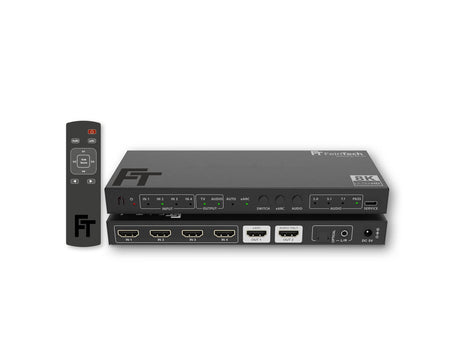
SW411 HDMI 2.1 Switch 4 In 1 Out with HDMI Audio Extractor (HDMI Audio, Toslink, AUX) | 4K 120Hz | eARC

Distribute up to 4 media players to 1 display with up to 4K 120Hz and extract the sound for your sound system

  • HDMI Audio Extractor: Versatile audio output for your home theater with HDMI, Toslink and AUX
  • Support for 8K 60Hz and 4K 120Hz: Enjoy lossless video and audio transmission, ideal for modern home theater and gaming setups.
  • eARC support: Easily transmit TV sound via all 3 audio outputs

Regular price €139,00
Tax included Shipping calculated at checkout.

Are you still unsure if it is the right solution for you? Contact us ! We are here to help you.

Does your company need a technology upgrade?
We make sure that your company is well equipped. Write to us and let us find the ideal solution! Inquire now

Specifications

  • HDMI version
    HDMI 2.1 up to 48 Gbit/s
  • Video resolution
    -
  • Number of HDMI inputs
    4
  • Number of HDMI outputs
    1
  • Audio output
    1x HDMI audio
    1x Toslink
    1x AUX
  • Compatible with eARC sound system
    -
  • Supported audio formats on audio out
    Dolby Atmos, DTS-X, multi-channel PCM up to 7.1, Dolby Digital 2.0 / 5.1, DTS 5.1, Dolby Digital Plus, Dolby TrueHD, Dolby MAT, DTS-HD, Stereo
  • EDID management
    Yes (audio only)
  • Supported gaming formats
    VRR, ALLM, QMS, QFT, SBTM
  • HDR (High Dynamic Range)
    -
  • HDCP
    • HDCP 2.3
    • HDCP 2.2
    • HDCP 1.4
  • HDMI-CEC control
    Yes (via HDMI)
  • HDMI-ARC from TV
    Yes
  • Auto switching
    Yes
  • Remote control
    -
  • Power source
    • Netzteil 5V DC (Euro-Stecker)

That's why we love this product

  • Ideal for home theater setups with multiple audio systems: Connect various audio devices, such as an AV receiver via HDMI, a soundbar via Toslink and headphones via AUX, and play the sound simultaneously on all outputs – for maximum flexibility and a customized
    Audio experience.
  • Best video quality for every setup: Experience brilliant image resolutions up to 8K at 60Hz and 4K at 120Hz – perfect for gaming, movies and streaming on modern TVs, projectors and monitors.
  • Seamless integration thanks to practical auto functions: The SW411 automatically switches between HDMI devices and TV audio, ensuring you always get the right audio signal. Features like auto-switching, auto-power, and HDMI-CEC make operation easier and more convenient.

Scope of delivery

1x SW411 HDMI 2.1 Switch
1x power supply with Euro plug
1x remote control including battery CR2025
2x mounting brackets
1x instruction manual

SW411 HDMI 2.1 Switch

Get the ultimate home theater experience with easy control

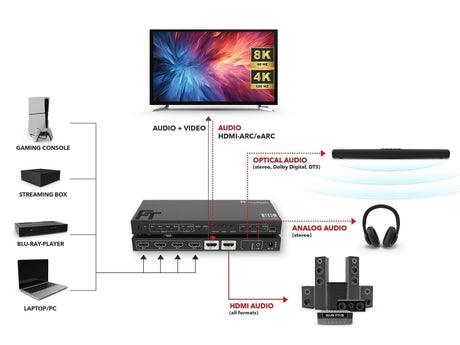
Connect up to four HDMI sources such as PS5, Xbox, or Apple TV and link them to your TV, projector, or monitor. The SW411 allows you to connect up to three sound systems and offers convenient auto-switching functions. Easily switch between inputs, control the volume via the TV remote (via HDMI), and use the auto-power function for convenient on/off.

More options for the best sound

Use the SW411's integrated HDMI audio extractor to output sound simultaneously via HDMI, Toslink, or AUX. This gives you the flexibility to choose between modern and legacy audio setups and enjoy an impressive sound experience – whether via HDMI for Dolby Atmos and DTS:X or via Toslink and AUX for classic audio formats. Experience the best sound on multiple sound systems simultaneously!

HDMI2.1 8K 60 Hz 4K 120Hz

Support for 8K 60Hz and 4K 120Hz

The SW411 HDMI 2.1 switch ensures lossless video and audio transmission at resolutions up to 8K 60Hz and 4K 120Hz. This makes it ideal for modern home theater and gaming setups that offer razor-sharp images and smooth motion. The integrated gaming features VRR (Variable Refresh Rate) and ALLM (Auto Low Latency Mode) ensure an optimal gaming experience without lag.

HDMI eARC ARC

Transmit TV sound thanks to ARC support

With ARC (Audio Return Channel), you can seamlessly play your TV's internal audio through connected sound systems. Simply connect the SW411 to your display's HDMI-ARC or HDMI-eARC port and activate eARC. The SW411 automatically detects whether the sound is coming from the TV source or one of your HDMI sources, ensuring a seamless audio experience. Thanks to HDMI CEC, you can also control the volume of your HDMI sound system directly with the TV remote – no additional settings required.

SW411 HDMI 2.1 Switch 4 In 1 Out with HDMI Audio Extractor for sound systems with HDMI, Toslink and AUX input

The SW411 HDMI 2.1 switch offers a powerful and versatile solution for connecting up to four HDMI devices, such as consoles (PS5, Xbox), PCs, or set-top boxes, to a display and an external sound system. Thanks to the integrated HDMI audio extractor, you can flexibly output audio from both the selected device and the TV (with HDMI eARC/ARC port). Alternatively, the switch can also be used to output audio to monitors or video projectors.

Most important functions at a glance:

  • 4 inputs for HDMI players: Connect up to 4 devices such as PS5, Xbox, Apple TV, PCs or set-top boxes to a TV, monitor or projector – without having to unplug anything.
  • Flexible audio output for sound systems: The integrated HDMI audio extractor enables audio output via HDMI, Toslink (optical audio) and AUX (analog stereo) – ideal for AV receivers or soundbars with a standard HDMI input.
  • Supports TV audio via HDMI-eARC/ARC: The switch supports audio transmission from the TV via HDMI-eARC/ARC, so you can easily pass the sound from TV apps and other internal sources to your sound system.
  • Supports all common audio and video formats: Supports 4K at 120Hz, 8K at 60Hz, Dolby Atmos, DTS:X as well as HDMI 2.1 features such as VRR, ALLM, QMS and QFT for an optimal gaming and movie experience.
  • Automatic device detection & easy control: The SW411 detects the last connected device and automatically switches to it – without any manual intervention. Alternatively, you can easily switch between inputs using the included remote control. Additionally, the HDMI-CEC function allows you to control the soundbar volume using the TV remote. Thanks to the auto-power function, the switch, display, and sound system turn on and off simultaneously – for maximum convenience.

HDMI 2.1 switch with 4 inputs and 1 output

The SW411 HDMI switch allows you to connect up to four HDMI devices, such as PS5, Xbox, Apple TV, PCs, or set-top boxes, to a single display. You can easily switch between different devices without constantly reconnecting cables. The switch is compatible with various display types, including TVs, projectors, and monitors. With the convenient auto-switching function, the switch automatically detects the last activated device and switches to it, so you can always use the device you want. Ideal for a flexible home theater or gaming setup.

HDMI Audio Extractor: Versatile audio output for any setup

The SW411 features a built-in HDMI audio extractor, allowing you to flexibly use audio across multiple outputs. You can output audio simultaneously through multiple outputs – the HDMI output supports all common audio formats, including Dolby Atmos, DTS:X, and PCM in various channels. For simultaneous audio transmission on all three audio outputs, set the audio format to PCM Stereo.

  • AUX (L/R) : Only the stereo signal (2.0 PCM) is output here.
  • Toslink (optical) : Offers the ability to output stereo, Dolby Digital, or DTS—ideal for older sound systems.
  • HDMI Output : The HDMI output supports all common audio formats and is ideal for passing the sound to a modern sound system with multiple HDMI inputs (such as an AV receiver or soundbar).
A notice:

Please note that operation with soundbars that only have an HDMI ARC/eARC port, such as Sonos or Bose, is not possible. Make sure your sound system has a standard HDMI input to fully utilize audio extraction via HDMI!

How to find the right connection for your sound system, we have here explained.

Support for modern audio formats for best sound

The SW411 offers comprehensive support for all common and latest audio formats, ensuring you enjoy the best possible audio experience. For immersive sound, such as that offered by modern formats like Dolby Atmos and DTS:X , your sound system must be connected via a standard HDMI input—ideally to an AV receiver or soundbar with at least two HDMI ports. This allows you to experience the impressive 3D sound of Dolby Atmos or DTS:X in the highest quality and utilize the full range of modern audio formats.

HDMI 2.1 support for modern video formats

The SW411 HDMI 2.1 switch supports the latest video formats and ensures razor-sharp images. With a maximum resolution of up to 8K at 60Hz and 4K at 240Hz, the switch guarantees outstanding image quality, both for high-resolution 8K displays and for fast 4K displays, which are especially important for gaming.

Thanks to HDMI 2.1, the SW411 also supports advanced features such as VRR (Variable Refresh Rate), ALLM (Auto Low Latency Mode), QMS (Quick Media Switching), QFT (Quick Frame Transport) and SBTM (Sports Mode) to enable smoother, judder-free images and instant response times when gaming.

The SW411 is not only optimized for the latest displays, but is also backward compatible with older devices. This means the Switch supports lower resolutions and older video formats without any loss of quality. Additionally, support for HDR10, HDR10+, HLG, and Dolby Vision ensures impressive colors and contrast that shine in all scenes, whether bright or dark.

Whether you're enjoying movies, streaming content, or playing games on your display, the SW411 always delivers excellent image quality, regardless of the resolution used.

Audio EDID management for optimal signal processing

The SW411 HDMI 2.1 switch features advanced audio EDID (Extended Display Identification Data) management, ensuring that the connected device automatically selects the best possible audio signal based on the capabilities of the display and sound system. This ensures optimal signal processing, ensuring you always get the best sound for your setup.

The EDID system automatically adjusts the audio format. You can adjust the audio mode using the EDID switch to choose between different formats. The available modes include:

  • 2.0 : PCM 2.0 (Stereo)
  • 5.1 : DTS, Dolby Digital, PCM 2.0
  • 7.1 : DTS, Dolby Digital, Dolby Digital Plus, Dolby Atmos, Dolby TrueHD, DTS-HD, DTS-X, PCM 2.0/5.1/7.1
  • PASS : Pass the audio formats of the HDMI audio device to OUT2

HDMI ARC/eARC support for TV audio

The SW411 HDMI 2.1 Switch offers a seamless way to route your TV's audio to an external sound system via HDMI-ARC or HDMI-eARC. The switch automatically detects whether the audio is coming from the TV and switches the audio output to HDMI-ARC/eARC once a signal is detected.

TV audio is output simultaneously on all three audio outputs—HDMI, Toslink, and AUX (analog stereo)—giving you the flexibility to choose between the different outputs. This lets you stream your TV audio directly to your sound system without having to manually switch between them.

Please note that for simultaneous output on multiple audio outputs, the sound format on the TV may need to be adjusted, since, for example, only PCM stereo can be transmitted via AUX (3.5mm jack).

Automatic switching for more comfort

The SW411 HDMI 2.1 Switch offers a convenient, automatic switching function that simplifies switching between your connected devices. The switch automatically detects the last connected device and seamlessly switches to it without you having to manually change the input. This allows for quick use and more flexibility in selecting your desired device, be it a PS5, Xbox, PC, or other HDMI-enabled device.

Thanks to the included remote control, you can also quickly and easily switch between devices and adjust the audio formats to your needs. Manually switching devices is a thing of the past – the SW411 ensures a smooth process.

Please note that this feature is not supported by all HDMI devices. Players like Apple TV or Shield TV do not completely shut down, meaning fully automatic switching is not possible with these devices.

HDMI-CEC control for easy operation

The SW411 HDMI 2.1 switch supports HDMI-CEC (Consumer Electronics Control), which allows you to control the volume and basic functions of your connected sound system directly from your TV's remote control. This eliminates the need to switch between different remote controls, simplifying operation.

Please note that HDMI-CEC only works for connected HDMI devices, and eARC must be enabled on the SW411 to use this feature. This allows you to conveniently control the volume using the TV remote, provided the connected sound system supports HDMI-CEC.

Auto-power function for automatic on/off

The SW411's Auto Power feature ensures that both the switch and the sound system connected to the HDMI port turn on or off automatically. As soon as you turn on your TV, the SW411 is activated, and the connected sound system also starts up. When you turn off the TV, the SW411 and the sound system turn off simultaneously—all without manual intervention.

However, you can also turn the SW411 on or off manually using the included remote control. If you want to disable the auto-on/off function, simply press the eARC button on the device for 5 seconds. Please note that HDMI eARC must be enabled on the SW411 for this function to work correctly.

Easy installation & high compatibility

The SW411 HDMI 2.1 switch integrates quickly and easily into your home theater setup. Simply connect up to four HDMI devices such as consoles, PCs, or set-top boxes and connect the switch to your display and sound system. No complex setup is required.

Thanks to its broad compatibility, the SW411 supports all common HDMI devices, including modern TVs, monitors, and projectors. Older HDMI devices are also seamlessly supported, giving you maximum flexibility in your device selection.

The Out 2 "Audio Only" port transmits the audio to a sound system, which must have a standard HDMI input. You can identify HDMI inputs by the markings on the devices. Standard HDMI inputs are often labeled "HDMI IN." On AV amplifiers, these HDMI ports are also often referred to as "Blu-ray," "Media Player," or "Game." These ports are responsible for receiving video and audio signals from a source device.

If, contrary to expectations, a device is incompatible, you can always contact our support team. The SW411 can be updated with new firmware via the USB-C interface to expand compatibility and resolve potential issues.

Optimal cable lengths and expansion options

For best performance, we recommend a cable length of less than 2 m for HDMI connections at 8K/4K 240Hz and less than 5 m for 4K 60Hz. For longer distances, HDMI fiber optic cables can be used to ensure stable signal transmission.

Technical data:

  • HDMI version HDMI 2.1
  • Signal inputs 4 x HDMI
  • Signal outputs HDMI, HDMI Audio (720p), SPDIF Toslink digital optical, Aux stereo analog (3.5 mm jack)
  • Supported copy protection HDCP 2.3/2.2/1.4
  • Data transfer rate 48 Gbit/s (maximum)
  • Supported video formats up to 8K 60Hz YUV 4:2:0 12-bit or 4K 240Hz RGB/YUV 4:4:4 12-bit
  • Supported functions VRR, ALLM, QMS, QFT, SBTM
  • Color space RGB, YUV 4:4:4, 4:2:2; 4:2:0
  • Supported color formats 8 bit / 10 bit / 12 bit
  • HDR (High Dynamic Range) HDR10, HDR10+, HLG, Dolby Vision
  • HDMI-CEC pass-through TV > player and audio system
  • CEC volume control TV > audio system
  • Supports HDMI-ARC/eARC from TV
  • Supported audio formats: DTS, DTS-HD (incl. DTS-X), Dolby True-HD (incl. Atmos), Dolby MAT, Dolby Digital Plus, AC3 (Dolby Digital), LPCM 2.0 – 7.1, DSD
  • Recommended HDMI cable length: in < 2 m, out < 2 m (8K) or in < 5 m, out < 5 m (4K 60Hz)
  • Power consumption < 4.5 W
  • Power supply 5 V DC, 1 A
  • Dimensions (W×L×H) 200 x 85 x 20 mm

Product Comparison

Browse this category

Compare our HDMI Audio Extractor for sound systems with HDMI input

A table comparing the facets of 5 products
Facet
SW411 HDMI 2.1 Switch 4 In 1 Out mit HDMI Audio Extractor (HDMI-Audio, Toslink, AUX) | 4K 120Hz | eARC - FeinTech
SW411 HDMI 2.1 Switch 4 In 1 Out with HDMI Audio Extractor (HDMI Audio, Toslink, AUX) | 4K 120Hz | eARC
View details
AX211 HDMI 2.1 Audio Extractor (HDMI-Audio) | 4K 120Hz | eARC - FeinTech
AX211 HDMI 2.1 Audio Extractor (HDMI Audio) | 4K 120Hz | eARC
View details
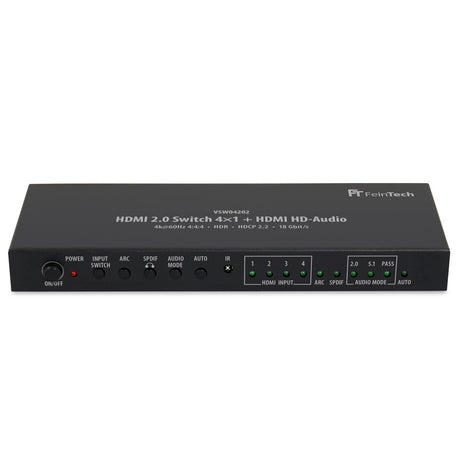
VSW04202 HDMI Switch 4 In 1 Out | 4K 60Hz | HDMI HD-Audio Extractor | Auto-Switching - FeinTech
VSW04202 HDMI Switch 4 In 1 Out | 4K 60Hz | HDMI HD Audio Extractor | Auto switching
View details
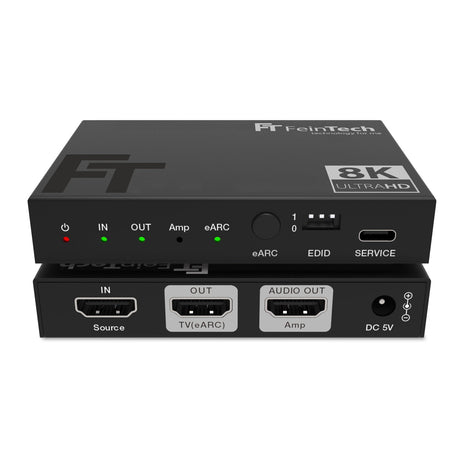
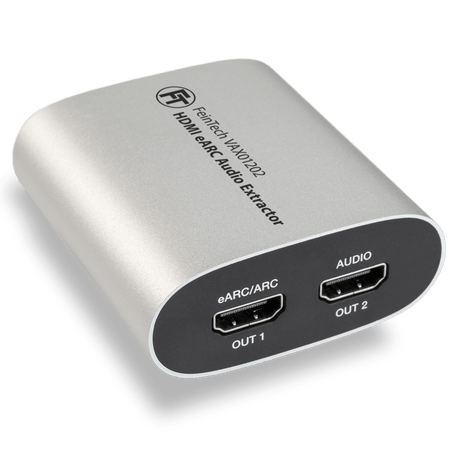
VAX01202 HDMI eARC Audio Extractor & Audio Splitter - FeinTech
VAX01202 HDMI eARC Audio Extractor & Splitter
View details
AX110 HDMI eARC Audio Konverter | TV-Sound für HDMI-Soundsysteme umwandeln - FeinTech
AX110 HDMI eARC Audio Converter | Convert TV sound for HDMI sound systems
View details
Price
Price
Regular price €139,00
Regular price €89,99
Regular price €59,99
Regular price €69,99
Rating
Rating
(18)
(11)
(21)
(20)
(9)
HDMI Version
HDMI Version
HDMI 2.1 up to 48 Gbit/s
HDMI 2.0b up to 18 Gbit/s
HDMI 2.1
HDMI Inputs
HDMI Inputs
-
-
-
-
-
HDMI Outputs
HDMI Outputs
1
1
1
1
0
Audio Output
Audio Output
1x HDMI audio
1x Toslink
1x AUX
1x HDMI audio
1x HDMI audio
1x Toslink
1x AUX
1x HDMI audio
1x HDMI audio
Video Resolution
Video Resolution
-
-
-
-
-
HDMI-CEC Control
HDMI-CEC Control
Yes (via HDMI)
Yes
No
Yes
Yes
EDID-Management
EDID-Management
Yes (audio only)
Yes
Yes (audio only)
No
No
Auto-switching
Auto-switching
Yes
-
Yes
-
-
Supported gaming formats
-
-
-
-
-
HDMI ARC from TV
HDMI ARC from TV
Yes
Yes
Yes
Yes
Yes
Compatible HDCP
Compatible HDCP
  • HDCP 2.3
  • HDCP 2.2
  • HDCP 1.4
  • HDCP 2.3
  • HDCP 2.2
  • HDCP 1.4
  • HDCP 2.2
  • HDCP 1.4
  • HDCP 2.2
  • HDCP 1.4
-

Kunden lobten den HDMI 2.1-Switch mit Audio-Extraktor für seine hervorragende Funktionalität. „Die automatische Umschaltung funktioniert sehr gut“ und die „einfache Installation“ waren gemeinsame Highlights. Das Gerät unterstützt 4K 120 Hz, eARC und eine nahtlose Audioextraktion. Einige stellten gelegentlich Probleme beim Umschalten von HDR/SDR bei bestimmten Fernsehgeräten und kleinere Audiofehler bei Moduswechseln fest. Möglicherweise ist eine manuelle Anpassung der Lippensynchronisation erforderlich. Insgesamt sehr zu empfehlen.

AudioInstallationDevicesSwitchHdrQualitySetupCompatibilityFunctionalityPicture
  • 5 stars: 14 (78%)
  • 4 stars: 2 (11%)
  • 3 stars: 1 (6%)
  • 2 stars: 1 (6%)
  • 1 star: 0 (0%)
P
Paul Curran
Works great

Auto switching works very well for me. Audio is sent to AVR with no issues.

R
Rainer Klusemann
Der HDMI Switch SW411 tut was er soll - empfehlenwert!

Vor kurzem habe ich nach einer sehr guten Online Beratung durch einen Feintech Mitarbeiter den HDMI Switch SW411 gekauft. Der SW411 tut was er soll und gibt auch die exakten Daten, mögliche Auflösung und Wiederholraten, des angeschlossenen Displays an die HDMI-Quellen weiter. Und auch der HDMI Audio Extractor arbeitet wie beschrieben. Der SW411 erhält von mir die Bewertung: Empfehlenswert ! 5 Sterne

N
Neirocash
SW411 HDMI 2.1 Switch 4 In 1 Out mit HDMI Audio Extractor (HDMI-Audio, Toslink, AUX) | 4K 120Hz |...

Ehrlich gesagt – ich hätte nicht erwartet, dass es so gut funktioniert.

Ich habe mehrere Geräte angeschlossen, alles lässt sich problemlos umschalten, das Bild ist klar und ohne Verzögerungen. Besonders gut gefällt mir, dass man den Ton separat ausgeben kann – das macht das Setup deutlich flexibler.

Ich nutze das Gerät täglich und hatte bisher keinerlei Probleme. Bin wirklich sehr zufrieden 👍

J
Jörn
Bewertung SW411

Der HDMI Switch arbeitet wie beschrieben und macht was er soll, ich bin damit zufrieden. Lippensynchronität der Zuspieler ist gegeben und die Audio Anschlüsse funktionieren. Was fehlt, wäre vielleicht noch eine Bluetooth Verbindung für meine Bluetooth Kopfhörer.

Ein Bluetoothsender wie der BT200 lässt sich einfach am SW411 anstecken, so dass zusätzlich der Ton an Kopfhörer übertragen werden kann. Bitte beachte aber, dass dies nur bei Stereo funktioniert. Bei höheren Audioformaten bleibt Bluetooth stumm.

S
Sacha Prins
Ideal way to upgrade home cinema system to HDMI 2.1

If, like me, you have an older AV processor that does all the hi-res audio decoding you need, but whose HDMI isn't with the times anymore (new TV, PlayStation5 and an Apple TV) than this unit is an ideal HDMI switch with pass through audio extractor. The alternative is ARC or eARC but that doesn't allow for passthrough hi-res audio.

The only drawback of this SW411 (and I guess every HDMI audio extractor) is that lip-sync (synchronisation between the TV and the audio) needs to be manually applied since the AV processor doesn't get video data with this audio only HDMI connection. But lip-sync can be applied either in the AV processor, or in the media player.

T
Triaxilator
Fantastisch.

Fantastisch, es macht alles was es soll. Die Installation war sehr einfach und in 1 Minute erledigt.
Es wird alles sofort erkannt und die CEC-UNTERSTÜTZUNG funktioniert einwandfrei. Mit der TV Fernbedienung schaltet sich TV, Extractor und Streaming-Box zugleich ein. Tolles Gerät.
Nach einer Woche Testzeit gab es nie Abweichung von der Funktionalität. Sehr zu empfehlen!

S
S.Nold
Top Produkte und einen sehr guten Kundendienst.

Habe mir eine HDMI Extractor und Switch Kombi bestellt. Der Switch funktioniert einwandfrei, ebenso das Glasfaser HDMI Kabel, was an anderen Orten das 4-fache kostet. Betrreibe beides an einem native 4K Sony Beamer -einfach nur perfekt.
Kann die Firma und deren Produkte nur weiterempfehlen.

C
Christian Kümmel
Top

Perfekt !!

J
Jana Adler

SW411 HDMI 2.1 Switch 4 In 1 Out mit HDMI Audio Extractor (HDMI-Audio, Toslink, AUX) | 4K 120Hz | eARC

R
Roland Langwald
Bin sehr froh wenn in diesem Bereich ein dt. Produkt einfach so funktioniert.

..und man gar keine kleingedruckte chinesische Bedienungsanleitung konsultieren muss, um festzustellen warum etwas nicht funktioniert. Bei Feintech alles fein :-)

P
Peter
For now I can't recomended it

This SW411 do not work corectlly with my LG G5 TV, do not back to SDR mode from HDR mode. It happens with all devices connected.
I have another HDMI Switch with 4K 60Hz support and work perfectkt, but not this SW411 too bad, because I wanted it for HDMI Extractor 2 in 1 device. This shoud be fixed with firmware! but still nothing.

We are in contact but have not been able to reproduce the problem on our televisions. We are happy to adjust the firmware of the SW411 if the problem occurs.

A
Andreas
Nahezu perfekt

Ich habe diesen Switch gekauft, um die beschränkten Fähigkeiten meines NAD T778 AVRs zu umgehen und die Fähigkeiten meines 4k 120Hz Beamers voll nutzen zu können. Es sind als Zuspieler ein AppleTV, ein Mac mini und eine PS5 angeschlossen und der AVR hängt jetzt am Audio Out des Switches. Das funktioniert super mit dem einzigen Wermutstropfen, dass es manchmal zu Tonstörungen kommt, wenn ich von TV auf Beamer Betrieb umschalte (der TV hängt noch am ARC Out des NAD AVR). Ansonsten klappt das völlig automatisch, so dass ich den Switch komplett im Schrank verstecken kann und die FB überhaupt nicht brauche. Top!

C
Chris
Great product

I have been looking for something like this for years. It works great and is a must have for those like me whom owns a good 1080p sound system. You won't regret this buy.

T
Thomas Dietrich
Ein Spitzengerät!!!

Das Gerät ist absolute Spitze! Der erste Switch, der voll umfänglich perfekt funktioniert. Selbst wenn man noch einen weiteren zweifach Umschalter dazwischen hängt. Außerdem ist das Gerät optisch ansprechend, Fernbedienung ist super und alles schaltet schnell und korrekt. Besser geht es nicht. Note 1+

E
Ernesto Doelling
Seamless HDMI audio extractor with multiple inputs - Simply does the job!

All fine so far for theintended use (Apple TV and Fire TV as sources, Sony projector as Video sink, Marantz amplifier as Audio sink).
One point less because it is not possible to control the volume of the Amplifier with the volume controls on any of the sources. (all devices support CEC).

M
Michael
Es ist mir keine korrekte Bewertung möglich.

Moin,

ich erwarb den SW211 im Vorfeld welcher aber selbst in Kombination von diversen Längen (Oehlbach von 75 cm bis 1,5 Meter) Probleme am PC und Fernseher
produzierte. Es flackerte bei 120 HZ, sporadisch. Bei 60 HZ kein Problem.
Da mehrere, sogar kurze Kabel, getestet wurden und ich mit eurem Support sprach gingen wir von einem Defekt aus, ich sollte den SW211 zurück schicken.
Ich bestellte mir ein upgrade, den SW411 mit 4k@120hz, was der vorherige auch unterstützen sollte. Leider ist auch mit diesem Gerät der Wurm drinnen.
Sobald ich den PC in 4096x2160 oder alle anderen Auflösungen bei 120 HZ
betreiben wollte flackerte das Bild sporadisch. Ich behalte beide Produkte da es anscheinend an meinem Fernseher liegt. der SW411 darf sein Dasein im Keller fristen um bei Reparaturen von Elektronik umschalten zu können. Den kleinen lasse ich von einem Arbeitskollegen mal testen.

Euer Support am Telefon ist TOP und geduldig, leider half alles nichts.

Eckdaten : Nvidia GF4090 RTX I9-14900K 96 GB RAM
Kabel : 3 verschiedene Längen (75 cm, 1meter, 1,5 Meter), doppelt gekauft, Marke Oehlbach
Kabel : 2 verschiedene Längen (0,5 Meter ,1 Meter) Marke "Irgendwas von Amazon"

Ich bin des Testens müde und denke es liegt nicht am Produkt.

D
Dudelstudio Hamburg
Endlich ein Switch, der mir Atmos ohne Latenz ermöglicht

Habe mich seit Monaten mit dem Thema Latenz bei Atmos über Earc vom TV und PS5 herumgeärgert und habe nun den ersten Switch gefunden, der keine Probleme Macht, wie Aussetzer von Bild und/oder Ton.
EDID Probleme, oder nicht erfüllte Specs in Sachen Bandbreite bzgl. VRR 4k 120 RGB HDR.
All das scheint zu klappen. Auch mit den Kabeln,die bei anderen Switches komplett versagten.

Ein kleines Problemchen gibt es in Verbindung mit meinem Bravia 9 jedoch auch.
Beim nutzen der TV interne Youtube App klappt der Audio Passthrough nicht jedes mal einwandfrei, sobald ein Video in Dolby 5.1 vorliegt, was zu lautem
Zirpen führt.
Bei den anderen Streaming Apps klappt der Passthrough aller erdenklichen Formate.

Am Windows PC kann ich nun erstmals
lagfrei Atmos in Games nutzen. Dtsx hab ich auch getestet.
Die Remote ist auch cool, sowie das automatische Umschalten der Quellen.
Als Atmos Receiver kommt ein Emotiva Basx MC1 Atmos Decoder zum Einsatz, der bisher super mit dem Switch harmoniert. Anders als direkt über sen Earc Port am TV

D
Daniel VIDAL
Parfait !

Ce commutateur est parfait, depuis que j'ai remplacé mon ancien hdmi 2.0 par ce 2.1, plus d'écran noir, meilleure stabilité, DV et colorimétrie améliorée !
A conseiller

G
George

Hello I have an older AV amplifier (Marantz SR 5005) that only supports HDMI 1.4 and a new 4k TV (Hisense 55U8Q). When I play 4k content with HD audio (Dolby TrueHD) from my tv's player I get distorted sound. So I guess I want a device to extract my audio from HDMI port of my TV and send it to my amplifier. Is this device (SW411) suitable? Thank you.

FeinTech

You could override the limited HDMI-ARC port of this AVR by using SW411 (for up to 4 players, or AX211 for just one player). Then - in theory - you can transmit TrueHD and DTS-HD audio to you AVR. But please note that usually internal TV apps can't play HD audio. In most cases an external player like Nvidia Shield is required to play Dolby TrueHD files.

T
Tom

Guten Tag, wie verhält sich der SW411 bezüglich EDID des Videosignals?
Werden einfach die EDID Daten des angeschlossenen Beamers (Sony VPL XW5000) an den Player (Aplle TV, Blueray Player, usw) weitergegeben oder gibt das EDID selber eine Auflösung/Framerate vor?
Ich brauche ein Gerät welches die EDID Daten (und auch den Videodatenstrom) zwischen Player und Beamer einfach durchreicht und nicht verändert. Das Audiosignal würde per HDMI oder TOS-Link an einen Receiver weitergereicht.

FeinTech

Am SW411 lassen sich wie beschrieben 8 verschiedene EDID Modi einstellen. Darunter auch COPY-Modi, welche die Original EDID des Projektors durchreichen. Beachte, dass ohne eine EDID-Modifikation die Zuspieler an einem solchen Projektor stumm blieben oder maximal stereo ausgeben könnten.

K
Kopfhörer Anschluss über Aux

Guten Tag, ich möchte den Sw411 nutzen um zwischen mehreren Hdmi Eingabegeräten zu wechseln. Den Sound möchte ich entweder über die im Fernseher (kein Hdmi arc) verbauten Lautsprecher oder über Kopfhörer mit einem 3,5mm Klinkenanschluss wiedergeben. Für mich wird aus Ihrer Beschreibung leider nicht ganz klar ob es bei der Soundeinstellung des Sw411 ein entweder/oder gibt. Also ob der der Sound aus dem Klinkenanschluss kommt und die Fernseh Lautsprecher damit stumm bleiben oder ob selbst bei angeschlossenem Kopfhörer Sound am Fernseher und dessen Lautsprecher ankommt. Vielen Dank für Ihre Mühe und freundliche Grüße
F. M.

FeinTech

Der Sound aus dem SW411 wird prinzipiell IMMER über ALLE Ausgänge übertragen (auch wenn es nicht alle Audiogeräte verarbeiten können). Wenn TV oder Zuspieler Stereo abspielen, kann der Ton also immer via Kopfhörer gehört werden. Wenn TV oder Zuspieler Dolby Digital abspielen, bleibt der Kopfhörerausgang stumm. Wenn der Fernseher die Quelle ist und per HDMI-ARC am SW411 angeschlossen wird und eARC aktiviert wird, schalten die meisten Fernseher ihre Lautsprecher ab.
Es funktionert also wie gewünscht, wenn alles von externen Playern am SW411 abgespielt wird und diese auf Stereo begrenzt werden.

Y
Yoshi

Ich verwende den Switch SW411 in Verbindung mit einem Ugoos AM6B+ Player, einem PC, LG G5 Fernseher und Denon AVR-4306 und habe folgendes Problem:

Sobald der Ugoos AM6B+ eingeschaltet ist und ein Bildsignal an den Switch liefert, funktioniert eARC vom Fernseher beim Ton via PC nicht mehr, was insofern kurios ist, als der Ugoos AM6B+ überhaupt nicht Teil der Kette ist.

Um das konkret zu machen:

Ugoos AM6B+ -> SW411 HDMI 1
Denon AVR-4306 -> SW411 HDMI2
SW411 TV/eARC -> LG G5 HDMI 2
SW411 Audio only -> Denon AVR-4306 HDMI
PC HDMI -> LG G5 HDMI 4

Der PC ist also direkt am Fernseher angeschlossen und Ziel ist es, den dort zugespielten Mehrkanal-PCM-Ton vom Fernseher über eARC abzugreifen und über den Switch AW411 extrahiert als Schwarzbild huckepack an den Denon AVR zu geben.

Genau das funktioniert, solange der Ugoos Netzwerkplayer ausgeschaltet ist. Sobald der aber läuft, funktioniert die eARC-Extraktion am SW411 nicht mehr, obwohl der HDMI-Eingang 1 am SW411 und dessen "Bilddurchschleifung" überhaupt keine Rolle spielt, da es ja um den Ton vom direkt an den Fernseher angeschlossenen PC geht. Es hilft auch nicht, am SW411 auf einen anderen Eingang wie HDMI 2,3 oder 4 zu wechseln. Sobald der Ugoos aktiv ist, war es das mit eARC.

Weitere Kuriosität: der Denon ist zwecks OSD ebenfalls per HDMI an den SW411 angeschlossen, doch dessen Bildsignal stört den SW411 und dessen eARC-Extraktion nicht.

Es ist sehr dubios und nervig. Vielleicht hat Feintech hier eine Idee, was da schiefläuft.

FeinTech

Vermutlich entsteht durch die direkte Verbindung des Fernsehers mit dem HDMI-Ausgang des AVR eine störende CEC-Verbindung bzw. Schleife. Der Player ist quasi doppelt mit dem TV verbunden (einmal via SW411 zum TV, ein weiteres Mal via SW411 Audio zum AVR und dann wieder zum TV). Wir empfehlen, auf die direkte Verbindung AVR zu TV zu verzichten. Wenn diese Verbindung zwingend gewünscht ist, um das AVR-OSD zu sehen, muss am AVR HDMI-LINK bzw. CEC ausgeschaltet werden.

Mann in Jeanshemd sitzt auf einem Sofa, isst Popcorn und schaut einen Fernseher mit Soundbar im gemütlichen Wohnzimmer.

Technik trifft Leidenschaft

FeinTech ist ein ambitioniertes und technikbegeistertes Team aus dem Spreewald, direkt vor den Toren Berlins. Wir entwickeln Produkte mit Leidenschaft und bieten unseren Kunden einen exzellenten Support.