AX421 HDMI eARC Switch for 2 sound systems to 1 TV – Flexible switching between two audio sources
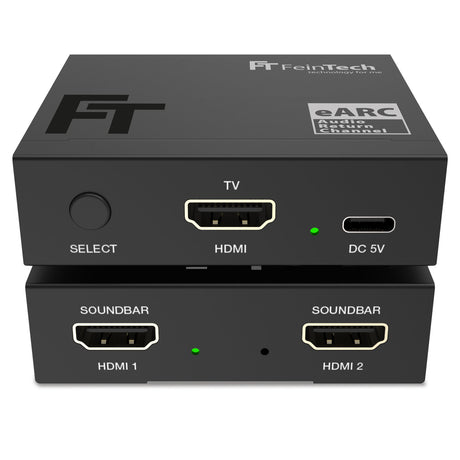
The AX421 allows for easy switching between two sound systems with HDMI-ARC or HDMI-eARC connections—ideal for a soundbar, AV receiver, or headphone stand. Perfect for anyone who wants more flexibility in their home theater setup.
Functions at a glance
- Alternate operation of two sound devices (eARC/ARC) on one TV
- Automatic switching when switching the sound devices on/off (when powered by USB)
- Supports HDMI-eARC and HDMI-ARC – compatible with all common audio formats
- No video transmission – only audio return channel (ARC/eARC)
- Optional: automatic switching on/off of the sound system with the TV
- Manual switching possible (automatic switching can be switched off)
- Compact and easy to integrate – no additional software required
World first for flexible audio switching
The AX421 is the first device of its kind that can switch a TV's ARC/eARC audio output between two different sound systems. Whether you want to switch between a soundbar and a headphone base or between an AV receiver and a D/A converter, the AX421 keeps your setup flexible and convenient.
Support for HDMI-ARC and HDMI-eARC
The AX421 supports both HDMI-ARC and HDMI-eARC, allowing you to use all modern audio formats – from simple stereo to Dolby Atmos. HDMI-eARC supports all audio formats, while HDMI-ARC supports only stereo, Dolby Digital, and DTS.
Important: Connect your preferred audio device to the AX421's HDMI 1 port. If an eARC-enabled device is connected there and recognized by the TV first, the switch will automatically use eARC.
If the second device only supports ARC, higher audio formats may not play correctly. To avoid this, connect the ARC device to HDMI 1 and restart (briefly disconnect the power) after connecting so the TV can re-detect the devices.
Automatic audio switching between two sound devices
The switch automatically switches between the connected sound systems depending on which device is turned on – provided the AX421 is powered via the optional USB port. This allows you to easily switch between a soundbar and an AV receiver, for example, without having to unplug cables.
Flexible manual control
In addition to automatic switching, you can also deactivate the function and manually switch between the two sound devices to have full control over your setup.
Automatic on/off
With the optional USB power supply, the Switch synchronizes the TV's power on and off with the last active sound system. This way, the TV and sound system turn on simultaneously. Without USB power, the sound system must be turned on separately.
Important note: Some sound systems also turn off the TV when turned off. This behavior can be adjusted on many devices using settings such as HDMI Link or HDMI Control.
Technical specifications
- Supported audio formats eARC: LPCM2.0–7.1, Dolby Digital, Dolby Digital Plus, Dolby TrueHD / Atmos, Dolby MAT, DTS, DTS-HD
- Supported audio formats ARC: LPCM2.0, Dolby Digital, DTS
- Recommended HDMI cable length: in < 5 m, out < 5 m
- Optional power supply via USB (5V, < 500 mA)
- Power consumption < 2 W
- Dimensions 70 x 60 x 21 mm
- Scope of delivery: HDMI eARC Switch 1x2, USB cable, instructions